HTML Translators
As an example, the following custom tag ("view-data") specifies a table that displays the dataset sepcified.
The above table would then be rendered as
In order to be able to render a set of custom tags, a translate tag needs to be included with the HTML. EAch tag specifies a URL from which to retrieve a library that will translate the custom tags into the corresponding functionality.
The following sample translate tag demonstrates linking in a translator library at the given URL.
For information about coding a translator, see translator code
Overview
A translator is library that translates a set of custom HTML tags into a specific display or other functionality.As an example, the following custom tag ("view-data") specifies a table that displays the dataset sepcified.
<view-data class="view-data" style="height:400px;" type="application/json">
<script type="json">
{
"sortable": true,
"filterable": true,
"altrows": true,
"columnsresize": true,
"defaultwidth": "160px",
"data": "category"
}
</script>
</view-data>
The above table would then be rendered as
In order to be able to render a set of custom tags, a translate tag needs to be included with the HTML. EAch tag specifies a URL from which to retrieve a library that will translate the custom tags into the corresponding functionality.
The following sample translate tag demonstrates linking in a translator library at the given URL.
<translate url="/lib/translate/v1.0.0/layout.mjs"></translate>
For information about coding a translator, see translator code
Integration Visual Studio
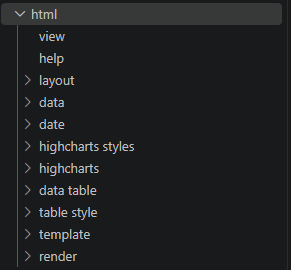 The davinci visual studio extension
contains utilities for utilizing translators. You can set up a translator tree which contains
links that insert custom tags into an open HTML editor. This links, whne clicked, will add a code snippet
to your currently open HTML editor, and insert whatever necessary translate tags to process
the snippet.
Setting up in Visual Studio
Setting up the translator quick link tree is done within the davinci settings form. Click the settings link in the nav tree.In the translate text area, enter a list of URL's that specifies a set of code snippets.
/lib/translate/v1.0.0/layout.json
/lib/translate/v1.0.0/data.json
/lib/translate/v1.0.0/highcharts.json
/lib/translate/v1.0.0/table.json
/lib/translate/v1.0.0/template.json
Translator JSON
The URLs sepcified in the translate settings (see above) must contain a list of objects, each with the following properties.- name:
- category - a name that the link appears under in the nav tree
- value - a piece of text that is inserted into the open HTML editor.
[{"name":"two column","category":"layout","value":"\n
\n"},
{"name":"three column","category":"layout","value":"\n\n
"},
{"name":"four column","category":"layout","value":"\n\n
"},
{"name":"full page","category":"layout","value":""}]