When creating or editing a page in the
davinci page editor,
you can send the page to another user, which will show up in their inbox.
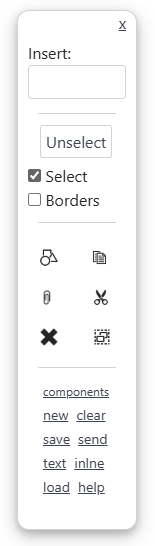
Click the send link in the control panel. This will open a dialog window. Select a user to send the page to.
This will create a copy of the page and send it to the selected user/users. If your page is already saved, you can
choose to send a link to the page. That is, when the selected users receive the page in their inbox, they are given a link
to your saved page instead of a copy. Any change to the original page will flow through.
Links bypass the normal page security mechanism. That is, any user who you have given a link to, will be able to view the page
regardless of whether you have granted them read permission. You can view and remove any links to your page from the
home app.